









How to pair your Bluetooth headphones to your Windows PC

There’s really nothing to it.

We may receive a commission on purchases made from links.

Bluetooth headphones and earbuds are now incredibly common, and more people than ever own a pair. But despite how long Bluetooth has been around, pairing Bluetooth headphones to a computer can still be fiddly. Microsoft hasn’t helped, either, with Windows 11’s Bluetooth stability a constant bugbear, too, making things even worse — but more on that later.

On paper, connecting headphones to a Windows 11 computer is relatively straightforward. The simplest way is to click the speaker icon in the bottom-right of the taskbar to open the quick settings panel, click the arrow next to the Bluetooth icon, and make sure the Bluetooth toggle is set to the on position.

Then, put your device in pairing mode. How you enter pairing mode differs between products, so refer to the documentation for your specific headphones or earbuds. You’ll usually need to hold down a button, often with the Bluetooth logo. Select your device when it appears in the list of Bluetooth devices, and you’re connected.

Connecting Bluetooth headphones to Windows 11 with the Settings app
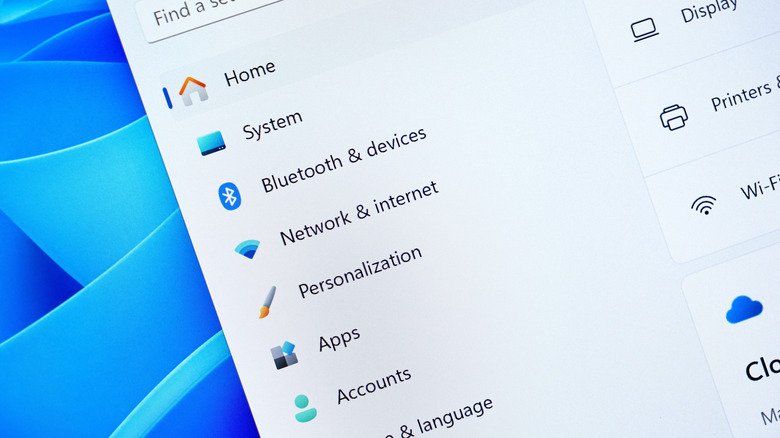
Connecting your Bluetooth earbuds or headphones to a Windows 11 PC is simple when things work correctly, but that doesn’t always happen. Bluetooth performance has long been a weak point on Windows 11, and Microsoft was still trying to improve things as of September 2026. If things don’t work, you’re probably not doing anything wrong and should look into other solutions, like updating your wireless drivers or rebooting your PC.

You can also pair Bluetooth headphones by pressing Win + I to open Windows 11’s Settings and selecting Bluetooth & devices from the left-hand menu. Make sure that Bluetooth is on, as indicated by the toggle. Below that toggle, you’ll see the name your PC shows up as on other devices, which only matters if the device you’re pairing has a screen. If you’re pairing for the first time, click Add device, then click Bluetooth. Make sure your headphones are in pairing mode. The PC will begin to scan for ready-to-pair Bluetooth devices. Once your device appears in the Windows dialog, click it, and it should pair after a few moments.

Some Bluetooth accessories support Swift Pair, which tries to proactively pair devices. Popular headphones, including the Sony WH-1000XM6 and Samsung Galaxy Buds 4 Pro — and previous models from those product lines — come with the feature. To set up a device with Swift Pair, make sure Bluetooth is enabled on your PC, then turn the device on and put it into pairing mode. You should see a pop-up on the PC asking if you want to connect with that device. Click Connect. Devices connected via Swift Pair will automatically connect to your PC.

Don’t miss these tips!

We don’t spam! Read more in our privacy policy

LEAVE A REPLY

Please enter your comment!
Please enter your name here

Hot this week

Zsela Invites You to The Party With New Album

CommentLoaderSave StorySave this storyCommentLoaderSave StorySave this storyZsela is getting...

Oura Ring Adds a Jet Lag Feature for Time Zone Travelers

Traveling to new places is good for the soul,...

Over a Third of Gen Z-ers Rely on AI for Friendship

As generational cohorts go, Gen Z has been saddled...

ART X Lagos 2026 Art Across Borders: Redefining Value

Exploring human anatomy through sustainable materials: Ghizlane Sahli’s Histoires...

Topics

Zsela Invites You to The Party With New Album

CommentLoaderSave StorySave this storyCommentLoaderSave StorySave this storyZsela is getting...

Oura Ring Adds a Jet Lag Feature for Time Zone Travelers

Traveling to new places is good for the soul,...

ART X Lagos 2026 Art Across Borders: Redefining Value

Exploring human anatomy through sustainable materials: Ghizlane Sahli’s Histoires...

Over a Third of Gen Z-ers Rely on AI for Friendship

As generational cohorts go, Gen Z has been saddled...

Featured Artist | Darrell Black

Darrell Black Frankfurt, Germanyhttp://darrell-black.pixels.com/@definismart My Darrell Urban Black, an American visual...

Related Articles

Popular Categories

News Feed

49ers win in Mexico and Bills stay top – NFL week 11

49ers win in Mexico and Bills stay top - NFL week 11To play this video you need to enable JavaScript in your browser.This video...

UK Championship match schedule, seeds & BBC TV coverage

UK Championship match schedule, seeds & BBC TV coverageTo play this video you need to enable JavaScript in your browser.This video can not be...

My weekend in Verbier – the Swiss ski resort where royalty and glamour meet family fun

 Standing at the summit of a 3,330-metre-high mountain, I wondered how on earth I had agreed to this as I prepared to launch off....

Inside fast-growing consumer brand Clean Cult’s carton crusade

Paper-based cartons and other fiber packaging alternatives to plastic continue to expand in the food and beverage sector, with sales nearing $500 billion in...

‘MobLand’ Adds ‘The Forsytes’ Actor Gregg Sulkin For Season 3

EXCLUSIVE: Paramount+ began rolling cameras on Season 3 of MobLand last week — and now the gangland drama has added a new recruit. Gregg Sulkin,...

‘The Hunger Games: Sunrise on the Reaping’ Dominates U.K., Ireland Box Office as ‘Ramayana’ Sets All-Time Indian Record

Lionsgate UK’s dystopian prequel “The Hunger Games: Sunrise on the Reaping” stormed to the summit of the U.K. and Ireland box office, debuting at...

Billy Ray Cyrus on Miley’s Wedding: ‘I’m the Proudest Dad Alive’

Trending on Billboard Billy Ray Cyrus has shared a series of photos from daughter Miley Cyrus’ wedding to Maxx Morando, with the “Achy Breaky Heart”...

Benny Benassi and Fedde Le Grand Set Three Australian Shows for January

Benny Benassi and Fedde Le Grand have added two Australian shows in January, expanding a run that until now consisted of a single appearance...

Adam Driver Teases His ‘X-Men’ Villain Mister Sinister to Seth Meyers

Robert Pattinson isn’t the only A-lister who has appeared in multiple massive movie franchises. Adam Driver starred as the lightsaber-wielding antagonist Kylo Ren in the...

Popular articles

49ers win in Mexico and Bills stay top – NFL week 11

49ers win in Mexico and Bills stay top - NFL week 11To play this video you need to enable JavaScript in your browser.This video...

UK Championship match schedule, seeds & BBC TV coverage

UK Championship match schedule, seeds & BBC TV coverageTo play this video you need to enable JavaScript in your browser.This video can not be...

My weekend in Verbier – the Swiss ski resort where royalty and glamour meet family fun

 Standing at the summit of a 3,330-metre-high mountain, I wondered how on earth I had agreed to this as I prepared to launch off....

Inside fast-growing consumer brand Clean Cult’s carton crusade

Paper-based cartons and other fiber packaging alternatives to plastic continue to expand in the food and beverage sector, with sales nearing $500 billion in...

‘MobLand’ Adds ‘The Forsytes’ Actor Gregg Sulkin For Season 3

EXCLUSIVE: Paramount+ began rolling cameras on Season 3 of MobLand last week — and now the gangland drama has added a new recruit. Gregg Sulkin,...

‘The Hunger Games: Sunrise on the Reaping’ Dominates U.K., Ireland Box Office as ‘Ramayana’ Sets All-Time Indian Record

Lionsgate UK’s dystopian prequel “The Hunger Games: Sunrise on the Reaping” stormed to the summit of the U.K. and Ireland box office, debuting at...

Billy Ray Cyrus on Miley’s Wedding: ‘I’m the Proudest Dad Alive’

Trending on Billboard Billy Ray Cyrus has shared a series of photos from daughter Miley Cyrus’ wedding to Maxx Morando, with the “Achy Breaky Heart”...

Benny Benassi and Fedde Le Grand Set Three Australian Shows for January

Benny Benassi and Fedde Le Grand have added two Australian shows in January, expanding a run that until now consisted of a single appearance...

Adam Driver Teases His ‘X-Men’ Villain Mister Sinister to Seth Meyers

Robert Pattinson isn’t the only A-lister who has appeared in multiple massive movie franchises. Adam Driver starred as the lightsaber-wielding antagonist Kylo Ren in the...